Business & selling
AI Automation Opportunity Finder | Workflow Planner & ROI Calculator for Business
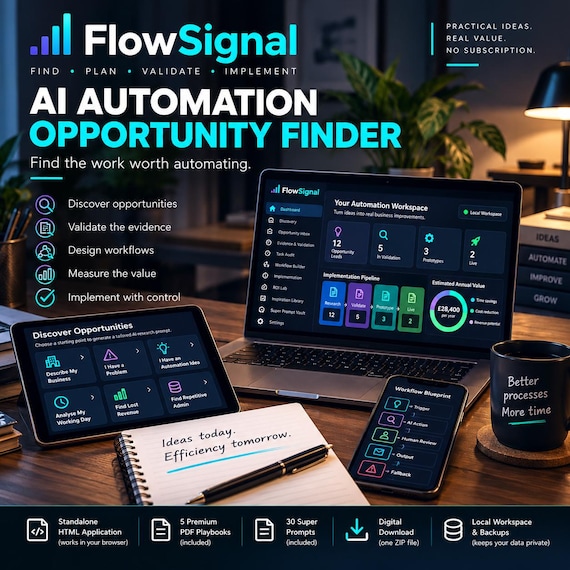
FIND THE RIGHT AUTOMATION OPPORTUNITIES BEFORE YOU BUY MORE SOFTWARE FlowSignal is a complete AI Automation Opportunity Finder and workflow-planning system for people who want practical business impro…
FIND THE RIGHT AUTOMATION OPPORTUNITIES BEFORE YOU BUY MORE SOFTWARE
FlowSignal is a complete AI Automation Opportunity Finder and workflow-planning system for people who want practical business improvements rather than thousands of disconnected prompts.
Describe your business, a frustrating process, an unfinished automation idea or a typical working day. FlowSignal creates a structured research prompt that you can use with free-access versions of ChatGPT, Claude, Gemini or Perplexity.
Bring the structured response back into FlowSignal and convert the AI suggestions into opportunity leads. Then validate the evidence, calculate potential value, create a workflow blueprint and move the strongest opportunities through a controlled implementation pipeline.
The application is supplied as a standalone HTML file. Open it in a modern web browser and begin building your own private automation workspace.
WHAT MAKES FLOWSIGNAL DIFFERENT
✓ Generates tailored AI opportunity-research prompts
✓ Opens free-access AI services directly
✓ Imports structured AI results as opportunity leads
✓ Separates AI suggestions from validated opportunities
✓ Adds evidence and confidence scoring
✓ Creates tool-neutral workflow blueprints
✓ Tracks implementation from research to live use
✓ Measures potential time and financial value
✓ Includes responsible-AI and human-approval controls
✓ Works locally without a FlowSignal subscription
SIX GUIDED DISCOVERY ROUTES
Choose the starting point that matches your situation:
✓ Describe My Business
✓ I Have a Problem
✓ I Have an Automation Idea
✓ Analyse My Working Day
✓ Find Lost Revenue
✓ Find Repetitive Admin
FlowSignal turns your answers into a professionally structured Super Prompt designed to produce clear, importable opportunity suggestions.
AI LAUNCHPAD
Use FlowSignal alongside free-access versions of:
✓ ChatGPT
✓ Claude
✓ Google Gemini
✓ Perplexity
Generate the prompt, copy it with one click and open your selected service.
No API key is required.
Important: FlowSignal does not include an AI subscription and does not silently connect to third-party services. Current availability, limits, pricing and privacy terms are controlled by each provider.
STRUCTURED RESULTS IMPORTER
Paste the correctly formatted AI response back into FlowSignal.
The importer can create opportunity leads containing:
✓ Opportunity name
✓ Business problem
✓ Current process
✓ Proposed workflow
✓ Trigger
✓ Required inputs
✓ Output
✓ Possible tool categories
✓ Time-saving hypothesis
✓ Commercial benefit
✓ Risk
✓ Human-review requirement
✓ Smallest safe test
✓ Evidence still needed
OPPORTUNITY INBOX
AI-generated ideas enter a dedicated review inbox.
From there you can:
✓ Review the suggestion
✓ Send it for evidence validation
✓ Create a workflow blueprint
✓ Remove unsuitable ideas
✓ Track how many opportunities are under consideration
EVIDENCE & CONFIDENCE ENGINE
An AI suggestion is not automatically a real business opportunity.
FlowSignal helps you verify:
✓ The problem has been observed
✓ Frequency and time have been measured
✓ Current tool capability has been confirmed
✓ Data and operational risk have been reviewed
✓ A pilot has been completed
✓ Actual benefit has been measured
Each completed validation gate increases the opportunity Confidence Score.
TASK AUDIT & AUTOMATION SCORING
Record recurring work and assess:
✓ Frequency
✓ Time required
✓ Repetition
✓ Rule clarity
✓ Data or operational risk
✓ Potential recoverable capacity
FlowSignal automatically ranks the strongest candidates and distinguishes between Automate, Review and Keep Human recommendations.
WORKFLOW BLUEPRINT STUDIO
Design the workflow before selecting software.
Define:
✓ Workflow name and owner
✓ Trigger
✓ Input
✓ Automation or AI action
✓ Human approval
✓ Output
✓ Failure fallback
The visual inspector presents each workflow as a clear trigger-to-output sequence.
IMPLEMENTATION PIPELINE
Move blueprints through four controlled stages:
Research → Validate → Prototype → Live
This keeps untested ideas separate from working, measured automations.
ROI LAB
Model the potential business case using your own assumptions:
✓ Hourly value
✓ Expected automation coverage
✓ Setup cost
✓ Monthly running cost
✓ Monthly hours potentially recovered
✓ Monthly gross value
✓ Estimated payback period
✓ Year-one net value estimate
All results depend on the information entered and should be treated as planning estimates.
30-DAY IMPLEMENTATION ROADMAP
Follow a controlled four-week sequence:
Week 1 — Define
Week 2 — Prototype
Week 3 — Validate
Week 4 — Release
The roadmap includes workflow mapping, controlled test data, failure testing, privacy checks, training, fallback and benefit measurement.
OPPORTUNITY INSPIRATION LIBRARY
Explore neutral examples covering:
✓ Missed enquiries
✓ Quote follow-up
✓ Appointment reminders
✓ FAQ triage
✓ Invoice chasing
✓ Job handover
✓ Daily summaries
✓ Document intake
✓ Review requests
✓ Content repurposing
✓ Meeting actions
✓ SOP assistance
✓ Onboarding
✓ KPI reporting
✓ Exception monitoring
These examples are inspiration only and are not presented as guaranteed or pre-validated solutions.
30 SUPER PROMPTS INCLUDED
The separate copy-friendly Super Prompt Vault includes focused prompts for:
✓ Business opportunity discovery
✓ Working-day analysis
✓ Repetitive admin
✓ Bottleneck investigation
✓ Customer friction
✓ Lost revenue
✓ Idea development
✓ Assumption testing
✓ Requirements and edge cases
✓ Value hypotheses
✓ Tool and integration research
✓ Cost and limitation research
✓ Privacy and risk
✓ Evidence verification
✓ Workflow blueprints
✓ Human approvals
✓ Failure and fallback logic
✓ SOP creation
✓ Test cases
✓ Adversarial testing
✓ Output quality
✓ Manual-versus-automated comparison
✓ Go / revise / stop recommendations
FIVE PREMIUM PDF PLAYBOOKS
You also receive:
1. FlowSignal Quick Start Guide
2. Automation Opportunity Playbook
3. Responsible AI & Risk Playbook
4. 30-Day Automation Sprint
5. Opportunity Workshop Pack
The supporting guides take you from first setup through discovery, validation, workflow design, testing and implementation.
DESIGNED TO FEEL LIKE PROFESSIONAL SOFTWARE
FlowSignal uses a modern coding and automation-inspired interface with:
✓ Dark SaaS dashboard
✓ Cyan, violet and mint system signals
✓ Terminal-style feedback
✓ Circular readiness charts
✓ Ranked opportunity cards
✓ Workflow visualisation
✓ Implementation boards
✓ Responsive desktop, tablet and mobile layouts
LOCAL WORKSPACE & BACKUPS
✓ Local browser autosave
✓ Full JSON backup export
✓ Restore from backup
✓ Blank customer workspace
✓ Optional neutral demonstration data
✓ Reset controls
✓ No FlowSignal subscription
Records are stored in the browser on the current device. Clearing browser data may remove locally stored records unless a backup has been exported.
WHAT YOU RECEIVE
✓ FlowSignal standalone HTML application
✓ Quick Start Guide PDF
✓ Automation Opportunity Playbook PDF
✓ Responsible AI & Risk Playbook PDF
✓ 30-Day Automation Sprint PDF
✓ Opportunity Workshop Pack PDF
✓ 30 Super Prompt Vault TXT
✓ Read Me
✓ Personal Use Licence
WHO IT IS FOR
✓ Small-business owners
✓ Freelancers
✓ Consultants
✓ Virtual assistants
✓ Operations professionals
✓ Team managers
✓ Service businesses
✓ People beginning to use AI seriously
✓ Anyone who wants to identify useful automation opportunities before purchasing more tools
HOW IT WORKS
1. Download and unzip the customer bundle.
2. Open the FlowSignal HTML file in a modern browser.
3. Describe the business, idea or problem.
4. Generate a tailored AI research prompt.
5. Copy it into your chosen AI service.
6. Paste the structured response back into FlowSignal.
7. Validate the strongest opportunities.
8. Create workflow blueprints and controlled pilots.
9. Measure the actual result.
10. Export regular backups.
PRODUCT FORMAT
✓ Digital download
✓ One ZIP customer bundle
✓ Standalone HTML browser application
✓ PDF and TXT supporting resources
✓ No physical product
✓ Not an Excel spreadsheet
✓ Not a Google Sheet
✓ Not an App Store or Google Play application
✓ No API key required for the manual AI Launchpad workflow
IMPORTANT INFORMATION
FlowSignal is an organisational, research and planning tool.
It does not automatically implement automations, connect external accounts, operate third-party AI services, guarantee time savings, generate guaranteed revenue or verify that a suggested integration currently exists.
Customers must verify current tool capabilities, availability, pricing, permissions, privacy requirements and suitability before implementation.
- ai automation
- business planner
- workflow mapping
- roi calculator
- productivity tool
- process improvement
- digital download
- business strategy
- small business
- efficiency tracker
- automation ideas
- smart planner
- uk business
 Business & selling