Business & selling
AppointFlow OS | Offline Appointment Booking App (HTML, Instant Download)
Juggling bookings across sticky notes, a paper diary and three different apps — and still getting no-shows?
Juggling bookings across sticky notes, a paper diary and three different apps — and still getting no-shows?
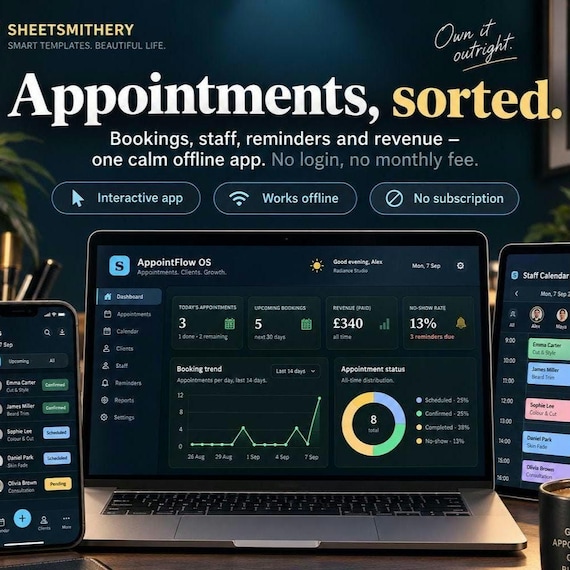
AppointFlow OS puts your whole appointment business in one calm, offline app. Take bookings with smart time slots that never double-book, cut no-shows with a built-in reminder tracker, keep client and staff records, handle payments, and see exactly how your week is performing. It runs in your web browser with no login, no monthly fee, and no data ever leaving your device.
Buy it once. Own it forever.
WHAT'S INCLUDED
Your download is a complete appointment-management app, plus everything you need to run it well.
The AppointFlow OS app runs in any web browser (Chrome, Edge, Safari, Firefox). No internet needed after download, no account, no install.
Inside, thirteen connected sections cover the whole business:
A live Dashboard with today's schedule, booking trends, revenue and a no-show rate you can actually act on.
A full Calendar with day, week and month views, colour-coded by status.
A smart New Booking wizard that only offers genuinely free slots — it reads each service's duration and buffer and each staff member's working hours, so you never double-book or overrun.
An Appointments list with filters, status and reschedule.
A Reminders & Follow-ups tracker that tells you exactly who to remind and when, so fewer clients slip through.
Client records with visit history and spend.
A Waiting List to fill cancellations fast.
Services (duration, buffer, price) and Staff (working days and hours) that drive the whole scheduling engine.
Payments & invoices with deposits and outstanding balances.
Reports showing revenue, bookings and the real cost of no-shows.
Settings for your hours, days and booking rules — plus one-click backup and restore.
You also get a printable Quick-Start Cheat Sheet and a full Customer Instruction Guide, both as clean PDFs.
WHO IT'S FOR
This is for any appointment-based business that wants to get organised without paying monthly for bloated software.
It suits salons, barbers, nail and lash techs, beauty and massage therapists, tattoo artists, tutors, coaches, trades and clinics — anyone who books clients by time and wants smart scheduling, fewer no-shows and clear numbers, all in a tool they own outright.
KEY BENEFITS
Never double-book again. Smart slots read your services and staff hours and only show times that genuinely fit.
Cut no-shows. The reminder tracker keeps you on top of who to contact, and Reports show what no-shows are costing you.
Own it outright. One purchase, no subscription, no per-booking fees.
Keep everything in one place. Bookings, clients, staff, payments and reports — no more scattered notes and apps.
Look professional. A clean, modern dashboard you'll actually enjoy using.
Stay private. Your client data never leaves your device.
HOW IT WORKS
Download the ZIP and unzip it.
Double-click the AppointFlow OS file — it opens in your web browser. (Comes pre-loaded with sample data so you can explore immediately.)
In Settings, set your opening hours, days and booking rules; add your services and staff.
Take a booking in the New Booking wizard — only free slots appear.
Use Reminders to cut no-shows, and Reports to see how you're doing.
Nothing to install, nothing to sign up for.
FILE TYPES INCLUDED
AppointFlow OS — interactive HTML app (opens in any modern browser; works offline)
Customer Instruction Guide — PDF
Quick-Start Cheat Sheet — printable PDF (A4 / US Letter friendly)
Read-Me with setup steps — included in the ZIP
Delivered as a single instant-download ZIP file.
IMPORTANT NOTES
This is a digital download — no physical item will be shipped.
The app runs locally in your web browser and saves your data in that browser, on that device. It is not a cloud app and does not sync between devices automatically — but you can export a backup file any time and import it elsewhere (full instructions included).
This is your private management app — a fast way for you to take and manage bookings by phone, in person or from messages. It is not a public client-facing booking website, and it does not send messages or take card payments itself.
This is an interactive software tool, not a course, an e-book, or a pack of prompts.
It is not affiliated with or endorsed by any booking platform or software provider.
All figures shown are based on the data you enter and are for your own management use.
Because this is an instant digital download, it is non-refundable once accessed. Please read the listing fully and message me with any questions before buying.
DOWNLOAD INSTRUCTIONS
After purchase, go to Etsy → You → Purchases & Reviews.
Find this order and click Download Files.
Save the ZIP to your computer and unzip it (right-click → Extract All on Windows; double-click on Mac).
Open the AppointFlow OS file — it launches in your browser.
Open the Cheat Sheet and Instruction Guide PDFs to get started.
Tip: digital files download best on a desktop or laptop rather than a phone.
FAQ
Do I need to install anything? No. It runs in the web browser you already have. Nothing to install, no account.
Is this a booking website my clients use? No — it's your private management app. You take and manage bookings in it quickly. It's not a public website, which is exactly why there's no monthly fee.
Does it need the internet? Only to download it. After that it works fully offline.
How do the smart time slots work? Each service has a duration and buffer, and each staff member has working days and hours. The booking wizard only offers slots that genuinely fit — no clashes, no bookings when staff are off.
Does it send reminders automatically? No — and that keeps your data private. It tells you exactly who to remind and when; you send the message from your own phone or email and tick it off.
Where is my data stored? Is it private? Entirely in your own browser, on your own device. Nothing is uploaded. Export a backup any time.
Will it sync across devices? Not automatically — it saves per browser. Move your data with the one-click Export and Import backup.
Can I use it for my type of business? Yes — salons, barbers, therapists, clinics, tutors, trades and more. Set your own services, staff and hours.
Can I get a refund? As an instant digital download it's non-refundable once accessed, so please ask me anything before buying.
- invoice template
- pricing tracker
- order tracker
- business bundle
- finance tracker
- bookkeeping
- small business
- self employed tool
- appointment app
- small business app
- appointment book
- schedule tracker
- no show tracker
 Business & selling