Business & selling
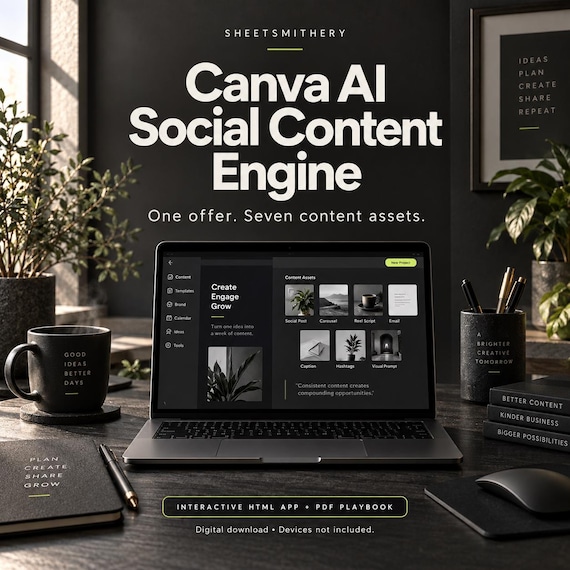
Canva AI Social Content Engine | Interactive HTML App + PDF Playbook
Make your next content campaign something you can build, review and repeat.
Make your next content campaign something you can build, review and repeat.
Canva AI Social Content Engine is a downloadable interactive learning app from SheetSmithery. It guides you from a focused business brief to seven content plans, tailored Canva prompts, saved design links and a publishing board.
Use the app alongside Canva: develop the message here, create the artwork there, then bring your design links back into your campaign. Start with your own business or explore the fictional Sunday Clay worked example.
WHAT YOU WILL BUILD
- Hero post
- Six-slide teaching carousel
- Reel cover plan (video production is separate)
- Three-frame Story sequence
- Proof post
- FAQ post
- Invitation post
- Captions, prompts, design notes and a publishing schedule
WHAT IS INCLUDED
- Self-contained interactive HTML app
- 21 practical lessons across seven creative stages
- Campaign brief and two-colour visual direction
- Seven editable draft structures with live hierarchy sketches
- Copyable Canva prompts tailored to your brief and each asset
- Publishing board with dates, design URLs and review status
- Text and CSV exports plus JSON project backup and restore
- 16-page PDF support playbook with all lessons, eight reusable prompts and troubleshooting
- Start Here instructions and personal-use licence
HOW IT WORKS
1. Download and extract your customer ZIP.
2. Open the HTML app in your desktop or laptop browser.
3. Enter one offer, audience, benefit and next action.
4. Edit your draft copy and follow the practical lessons.
5. Open Canva, create your designs and save their links back into the app.
6. Review the collection and export your campaign copy and schedule.
CANVA FREE ROUTE INCLUDED
The app links to Canva and explains a manual design route using blank designs, free elements and your own photos. Canva AI tools and allowances vary by account and plan. Your own Canva account and internet access are required for Canva. No subscription or AI credits are included.
PLEASE READ BEFORE BUYING
This is a digital download. No physical items are supplied. The course app works offline; external Canva tools require internet. The app prepares structured drafts and prompts. It does not contain an AI model, automatically create Canva designs, sync with Canva or publish social posts. Images, videos and finished Canva templates are not pre-made deliverables in the customer ZIP; you create your own artwork using the workflow.
Best used on a desktop or laptop in a modern browser. Smaller-screen layout is available, but physical mobile devices have not been tested. Locally downloaded HTML compatibility on iPhone and iPad is not guaranteed.
Work saves in the browser on your device. Use the project backup regularly, especially before clearing browser data or changing device. This course uses practical creation and review rather than quizzes or a certificate.
For the purchasing buyer's personal or business learning use, including creating content for brands they manage. Course files may not be resold, shared or redistributed. Independent SheetSmithery product, not affiliated with or endorsed by Canva. No reach, revenue or platform outcome is guaranteed.
FAQ
Is this an editable Canva template bundle?
No. It is an interactive HTML learning app with a PDF playbook. You build your own designs in Canva.
Do I need Canva Pro?
The manual learning route uses free elements and blank designs. AI access differs by plan; some AI tools or assets may require payment. You can complete the design process manually.
Does the app generate images or publish posts?
No. It prepares structured copy drafts, design instructions and personalised prompts from your inputs. You create artwork in Canva and publish using your chosen platforms.
How long does the course take?
There are 21 self-paced lessons, roughly 10-20 minutes each plus design practice. Work through the seven stages at a pace that fits your campaign.
Can I use my own business?
Yes. The brief feeds the editable drafts and prompts. The Sunday Clay example is fictional and optional.
Can I use it on another device?
Back up the JSON project and restore it in the app on a compatible browser. The app does not sync accounts or cloud storage automatically.
- canva ai course
- canva tutorial
- content planner
- social media course
- ai prompts
- marketing planner
- small business tools
- content creation
- digital marketing
- instagram planner
- social media toolkit
- html planner
- canva beginner
 Business & selling