Business & selling
FlowBudget OS | Offline Business & Personal Finance Planner
Wish you could see the money coming before it arrives — and the shortfalls before they hit?
Wish you could see the money coming before it arrives — and the shortfalls before they hit?
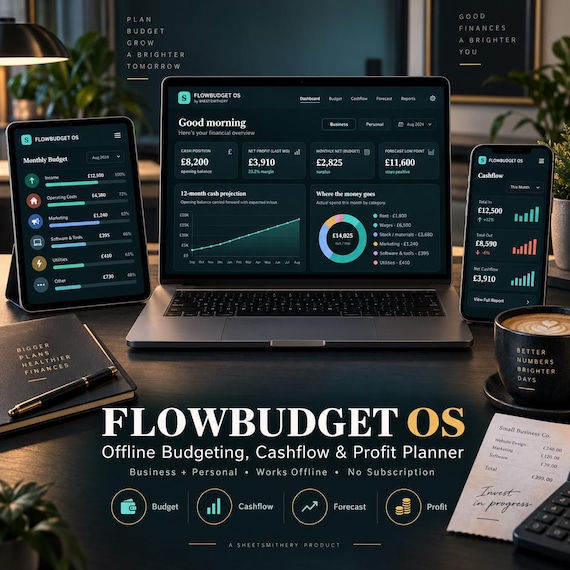
FlowBudget OS puts your whole financial picture in one calm, offline app. Set a budget, project your cashflow twelve months ahead, analyse your real profit, and test any spend with a built-in ROI calculator.
Switch to Personal mode and it becomes a household planner with savings goals and a debt-payoff tool. It runs in your web browser with no login, no monthly fee, and no data ever leaving your device.
Buy it once. Own it forever.
WHAT'S INCLUDED
Your download is a complete budgeting and forecasting app, plus everything you need to use it well.
The FlowBudget OS app runs in any web browser (Chrome, Edge, Safari, Firefox). No internet needed after download, no account, no install. A single switch flips it between Business and Personal modes.
Inside, you get:
A live Dashboard showing your cash position, latest net profit, monthly surplus and your forecast low point — with a next-best-action that reads your own numbers.
A Budget you can plan by category, with actual-vs-planned tracking and automatic overspend flags.
A Cashflow Forecast that projects your bank balance twelve months ahead using your income, costs, a growth rate and any one-offs — and shows the low point before it happens.
A P&L Analysis breaking revenue into cost of sales and overheads, with gross and net margins and a monthly table.
An ROI Calculator to test any purchase or investment: payback period, total return and ROI percentage, with a clear verdict.
A Savings Goals tracker (Personal mode) that shows exactly when you'll hit each target.
A Debt Payoff planner (Personal mode) with snowball and avalanche strategies, showing your debt-free date and the interest each approach saves.
Reports that surface your margins, biggest costs and cash direction.
Plain-English Help, plus one-click backup and restore.
You also get a printable Quick-Start Cheat Sheet and a full Customer Instruction Guide, both as clean PDFs.
WHO IT'S FOR
This is for anyone who wants to feel in control of money instead of guessing.
On the business side it suits small business owners, freelancers, shops, salons, trades and side-hustlers who want budgets, cashflow forecasts and real profit numbers without expensive accounting software. Flip to Personal mode and it's just as at home for households, couples and individuals wanting to budget, build savings and clear debt. One purchase covers both.
KEY BENEFITS
See problems before they happen. The 12-month cashflow forecast shows your low point while there's still time to act.
Know your real profit. P&L analysis turns revenue and costs into the margins that actually matter.
Spend with confidence. The ROI calculator tells you whether a purchase pays for itself — before you commit.
Budget without the guesswork. Plan vs actual, with overspends flagged automatically.
Get out of debt faster. Compare snowball and avalanche and see your debt-free date.
Own it outright. One purchase, no subscription, no per-use fees.
Stay private. Your financial data never leaves your device.
HOW IT WORKS
Download the ZIP and unzip it.
Double-click the FlowBudget OS file — it opens in your web browser. (Comes pre-loaded with sample data so you can explore immediately.)
Choose Business or Personal mode, and set your currency and opening balance in Settings.
Enter your income, costs and balances.
Watch your forecast, profit and plans update instantly.
Nothing to install, nothing to sign up for.
FILE TYPES INCLUDED
FlowBudget OS — interactive HTML app (opens in any modern browser; works offline)
Customer Instruction Guide — PDF
Quick-Start Cheat Sheet — printable PDF (A4 / US Letter friendly)
Read-Me with setup steps — included in the ZIP
Delivered as a single instant-download ZIP file.
IMPORTANT NOTES
This is a digital download — no physical item will be shipped.
The app runs locally in your web browser and saves your data in that browser, on that device. It is not a cloud app and does not sync between devices automatically — but you can export a backup file any time and import it elsewhere (full instructions included).
This is an interactive planning tool, not a course, an e-book, or a pack of prompts.
All figures — budgets, forecasts, projections, ROI, profit and debt timelines — are planning estimates based on the numbers you enter. They are not guarantees, and nothing in this product is financial, tax or investment advice. For important decisions, please consult a qualified professional.
It is not affiliated with or endorsed by any bank, accountant, or software provider.
Because this is an instant digital download, it is non-refundable once accessed. Please read the listing fully and message me with any questions before buying.
DOWNLOAD INSTRUCTIONS
After purchase, go to Etsy → You → Purchases & Reviews.
Find this order and click Download Files.
Save the ZIP to your computer and unzip it (right-click → Extract All on Windows; double-click on Mac).
Open the FlowBudget OS file — it launches in your browser.
Open the Cheat Sheet and Instruction Guide PDFs to get started.
Tip: digital files download best on a desktop or laptop rather than a phone.
FAQ
Do I need to install anything? No. It runs in the web browser you already have. Nothing to install, no account.
Is this for business or personal use? Both. A single switch flips between Business mode (budget, cashflow, P&L, ROI) and Personal mode (budget, savings goals, debt payoff).
Does it need the internet? Only to download it. After that it works fully offline.
Do I need to understand accounting? No. You enter simple numbers and the app does the maths, explaining terms like gross margin and COGS in plain English.
How does the cashflow forecast work? It carries your opening balance forward using your expected income (with an optional growth rate), your costs, and any one-offs you add — then shows your projected balance and its lowest point.
Is this financial advice? No. It's a planning tool. All figures are estimates based on what you enter, and nothing here is financial, tax or investment advice.
Where is my data stored? Is it private? Entirely in your own browser, on your own device. Nothing is uploaded. Export a backup any time.
Will it sync between devices? Not automatically — it saves per browser. Use Export and Import backup to move your data.
Can I get a refund? As an instant digital download it's non-refundable once accessed, so please ask me anything before buying.
- pricing tracker
- order tracker
- business bundle
- finance tracker
- bookkeeping
- small business
- self employed tool
- small business app
- budget app
- cash-flow forecast
- debt payoff
- roi calculator
- forecast
 Business & selling