Workplace & HR
Staff Management Toolkit | Google Sheets & Excel Rota Planner (Instant Download)
Running a team means juggling rotas, hours, overtime, payroll costs, holiday requests, new starter inductions, training records and probation reviews — all at once, usually without enough hours in the day.
Running a team means juggling rotas, hours, overtime, payroll costs, holiday requests, new starter inductions, training records and probation reviews — all at once, usually without enough hours in the day. This complete staff management bundle gives you two premium, ready-to-use spreadsheet toolkits that cover every stage of the employee lifecycle, from scheduling shifts to signing off probation. Works in Google Sheets and Microsoft Excel. Set up in minutes, used all year.
WHAT'S INCLUDED
2 workbooks · 11 tabs · Google Sheets & Excel
📅 Tool 1 — Staff Shift & Hours Tracker (6 tabs)
Everything you need to plan shifts, track hours and manage your team's time — all in one place.
Staff Directory & Setup — enter each team member's name, role, contracted hours, hourly rate and annual leave once. Every other tab references this automatically, so you never enter the same detail twice.
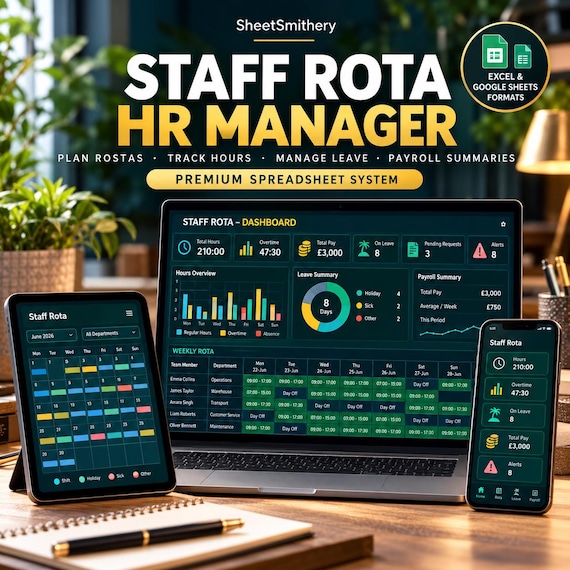
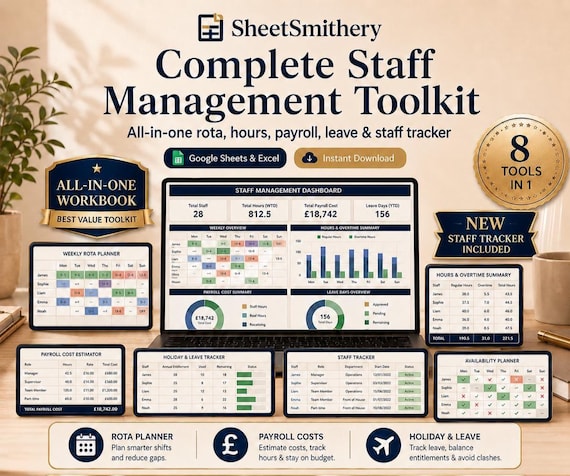
Weekly Rota & Shift Planner — enter shift start and end times for each person and the maths takes care of itself. Total hours worked, remaining contracted hours and overtime calculate instantly. Overtime cells turn red so you can spot issues before you confirm the rota. Supports up to 30 team members with a shop totals row showing your full team's position at a glance.
Monthly Hours & Overtime Summary — a full-year view of hours worked versus contracted hours for every person, with year-to-date overtime totals and monthly breakdowns. Enter actual monthly hours and the summary updates instantly.
Payroll Cost Estimator — hourly rates pull from the Staff Directory automatically. Enter regular hours and overtime hours and get an instant weekly labour cost per person and in total. Set a weekly budget target and see immediately if you are over or under before you finalise the rota.
Holiday & Leave Request Log — track annual entitlement, carry-over days, days taken, pending requests and sick days for your whole team. Remaining balance calculates automatically and colour-coding shows at a glance who is running low on leave.
Staff Availability Planner — staff record their availability using a simple dropdown before you build the rota. Options are All Day, AM Only, PM Only and Unavailable. Daily count totals show how many people are free each day, colour-coded for instant visual clarity.
🎓 Tool 2 — Staff Training & Induction Tracker (5 tabs)
A complete onboarding and training system that ensures every new starter gets the same consistent, professional experience.
New Starter Directory — a central record of every new joiner with name, job title, department, start date, line manager and probation end date. All other tabs in this workbook reference this automatically. Status dropdown tracks each person as Active, Completed, Extended or Left.
Induction Checklist — a structured 26-task checklist covering five phases from Pre-Arrival through to Month 3. Pre-Arrival tasks cover offer letters, IT setup and payroll. Week 1 covers introductions, health and safety, right-to-work, systems access and policies. Week 2 covers shadowing, e-learning and process walkthroughs. Month 1 covers progress review, probation check and objective-setting. Month 3 covers probation review, employment confirmation and feedback collection. Log completion dates and update status using the dropdown. A progress summary shows tasks completed versus total at a glance.
Training Log — record every course your team completes with course name, provider, date, pass or fail result, certificate status and expiry date. A Renewal Due column flags certificates automatically as Current, Due Soon (within 60 days) or Expired — no manual checking needed.
Skills Matrix — a colour-coded team-wide view of who is trained in what. Ten skills pre-loaded including Manual Handling, Fire Safety, First Aid, GDPR, Food Hygiene and more — all fully editable to match your business. Mark each person as Trained, In Progress, Not Trained or Not Required using a dropdown. Trained count totals at the bottom show coverage gaps instantly.
Probation Tracker — track mid-point and final review dates, progress notes and outcomes for every new starter. Outcome dropdown options are In Progress, Passed, Extended and Failed. A simple, auditable record for every probation period.
WHO IT'S FOR
Small business owners managing a team of any size
Retail, hospitality, café and shop managers handling rotas and new starters
Office managers and HR administrators running structured onboarding
Line managers responsible for scheduling, probation reviews and compliance training
Any employer who wants a professional, consistent people management process without expensive HR software
KEY BENEFITS
Plan shifts, track hours and flag overtime — all automatically
Know your weekly labour cost before it hits your bank account
Never lose track of holiday entitlement, sick days or pending leave requests
Onboard every new starter consistently with a 26-task induction checklist
See who is trained in what across your whole team at a single glance
Track probation reviews and outcomes in one organised, auditable place
Works for teams of 1 to 30 people
No formulas to build and no HR software subscription needed
Works in both Google Sheets and Microsoft Excel
HOW IT WORKS
Download instantly after purchase — you will receive two Google Sheets links and two Excel files
Set up the Staff Directory in each workbook — names, roles, contracted hours and rates
Start using whichever tool you need — rota planning, payroll forecasting, induction tracking or skills management
Both workbooks are fully independent and can be used together or separately
FILE TYPES INCLUDED
2 × Google Sheets — access links included (make a copy to your Google Drive to edit)
2 × Microsoft Excel (.xlsx) — compatible with Excel 2016 and later
1 × Instruction Guide PDF — covers both tools with step-by-step setup for non-technical users
IMPORTANT NOTES
Digital download only — no physical product will be shipped
Google Sheets requires a free Google account
Editing works best on desktop — not optimised for mobile
Designed for UK working patterns and employment practice — easily adjustable for any country
Formula cells are styled read-only so you cannot accidentally break calculations
This is a practical management tool, not legal or HR advice
DOWNLOAD INSTRUCTIONS
After purchase, go to Etsy account → Purchases & Reviews → Download Files
You will receive a ZIP file containing both Excel files, both Google Sheets access links and the Instruction Guide PDF
Google Sheets: click the link → File → Make a Copy → save to your Google Drive
Excel: open the .xlsx files directly in Microsoft Excel
Read the Instruction Guide first — full setup for both tools takes around 15 minutes
FAQ
Do I get both tools in one download?
Yes — one ZIP file contains both workbooks (Google Sheets links and Excel files) plus the Instruction Guide PDF.
Do the two workbooks link to each other?
No — they are intentionally independent so you can use one without the other. Staff names are entered separately in each workbook's own directory tab.
Can I use both tools for the same team?
Yes — both workbooks are designed to work side by side. Use the Shift Tracker to manage your week-to-week scheduling and the Training Tracker to manage onboarding and development.
Can I add more than 30 team members?
Both workbooks support up to 30 team members by default. To add more, insert rows above the totals row and copy the formatting from the row above. Message us if you need guidance.
Is this suitable for a new business or first hire?
Yes — the induction checklist is particularly useful if you are hiring for the first time and want to make sure nothing important gets missed in those first critical weeks.
Does it work on a Mac?
Yes — both Google Sheets and Excel versions work on Mac.
Can I share the Google Sheets versions with colleagues?
Yes — open your copy in Google Drive, click Share and add their email address with the level of access you want.
What if I need help setting things up?
Message us on Etsy — we respond within 24 hours and are happy to help with any questions.
- staff induction
- rota planner excel
- overtime tracker
- staff rota
- staff training
- probation tracker
- manager
- manager helper
- staff management
- rotas
- workforce planning
- people management
- hr toolkit
 Workplace & HR