Travel
Travel Budget Planner Spreadsheet | Trip Expense Tracker (Excel, Google Sheets)
Keep the money side of your trip organised from the first booking to the final day away.
Keep the money side of your trip organised from the first booking to the final day away.
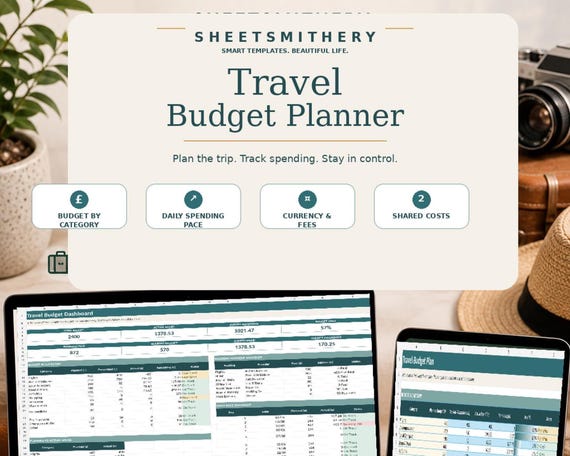
The SheetSmithery Travel Budget Planner is a focused 10-sheet spreadsheet system for travellers who want to plan a realistic budget, record what they actually spend and keep the financial details of a trip visible without working through a huge all-in-one travel planner.
Start with your dates, travellers, overall budget and currencies. Plan spending by category, track booking deposits and balances, record expenses in the currency shown on your receipt, review your daily spending pace and see an equal-share view of costs marked as shared.
The workbook includes realistic sample data so you can see how the system works before replacing the examples with your own trip information.
WHAT IS INCLUDED
- 1 master Travel Budget Planner XLSX workbook
- Travel Budget Planner Quick Start Guide PDF
- Read Me First file
- Personal Use Licence
WORKBOOK SECTIONS
1. Start Here
2. Dashboard
3. Trip Setup
4. Budget Plan
5. Expense Log
6. Daily Pace
7. Bookings & Payments
8. Currency & Fees
9. Group Split
10. Notes
GENUINE FEATURES
- Live travel budget Dashboard
- Overall budget, actual spend and remaining-budget summary
- Category budget planning
- Booked and committed cost comparison
- Actual travel expense log
- Manual home and local currency setup
- Per-transaction conversion into home currency
- Optional card and ATM fee assumptions
- Daily trip spending pace
- Revised remaining daily allowance
- Booking references, deposits, due dates and balances
- Shared-cost tracking by traveller
- Equal-share net position for shared expenses
- Dropdown fields
- Conditional formatting
- Filters and freeze panes
- Travel budget chart
- Realistic sample trip data
- UK date format
- UK pound formatting for home-currency values
- No macros, VBA, scripts or external data connections
HOW TO USE
1. Open Trip Setup and replace the sample trip information.
2. Set the overall trip budget and the amount already saved or set aside.
3. Enter your home currency, local currency and the manual rate you want to use.
4. Plan category amounts in Budget Plan.
5. Record bookings and payment balances in Bookings & Payments.
6. Log actual costs in Expense Log.
7. Review Daily Pace and the Dashboard as spending changes.
8. Mark appropriate expenses as shared and review Group Split.
CURRENCY NOTE
The workbook does not fetch live exchange rates. You enter the Home per 1 Local rate you want to use. Card and ATM fee calculations use only the assumptions entered in Trip Setup. Your bank, card provider or exchange service may use different rates and fees.
GROUP COST NOTE
Group Split provides an equal-share net position from expenses marked Shared? = Yes. It does not create payments or calculate an optimised person-to-person settlement matrix.
COMPATIBILITY
Microsoft Excel: Open the supplied XLSX directly.
Google Sheets: Upload the same XLSX file into Google Drive or Google Sheets and open it there.
The workbook uses standard formulas and common spreadsheet features selected for normal Google Sheets import. It was not live-tested inside Google Sheets during production. Minor visual differences in fonts, charts, conditional formatting, widths or print layouts may occur after import.
DIGITAL PRODUCT
This is a digital download. No physical product will be posted or shipped.
PERSONAL USE
Your purchase is licensed for your own personal use. You may edit the workbook for your own needs and keep a personal backup copy. Resale, redistribution, sharing, marketplace upload and use as the basis of another product for resale are not permitted.
SUPPORT
For help with the supplied product files, contact SheetSmithery through Etsy Messages.
- travel budget
- trip budget planner
- vacation budget
- travel expense
- trip expense tracker
- Google sheets travel
- excel travel planner
- holiday budget
- travel spreadsheet
- daily travel budget
- currency tracker
- trip spending
- Google sheets
 Travel