Learn & create
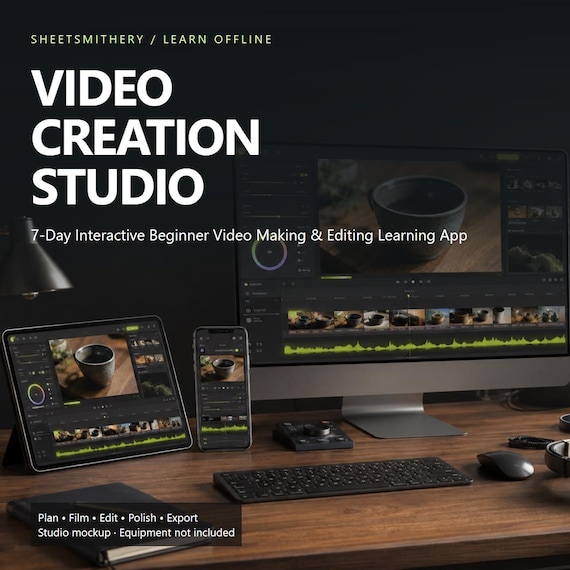
7-Day Video Editing Learning App | Interactive Beginner Course
Turn your first video idea into a clear plan, a confident shoot and a thoughtful edit.
Turn your first video idea into a clear plan, a confident shoot and a thoughtful edit.
Video Creation Studio is a self-contained downloadable HTML learning app for complete beginners. Open it in a compatible browser and work through seven structured days at your own pace. No account or subscription is required for the core experience.
LEARN THROUGH PRACTICE
Day 1: purpose, audience, video briefs, A-roll/B-roll, shot lists and storyboards.
Day 2: shot sizes, angles, thirds, headroom, lead room and camera movement.
Day 3: light, microphone placement, room tone, exposure, white balance, resolution and frame rate.
Day 4: sequencing, trims, splits, ripple timing, continuity and pacing.
Day 5: dialogue/music balance, ambience, captions and responsible media use.
Day 6: exposure and colour correction, titles, safe areas and transitions.
Day 7: final review, aspect ratios, cover planning and export settings.
YOUR CREATIVE WORKSPACE
15 tool destinations: Shot Planner, Storyboard Builder, Composition Lab, Camera Movement Explorer, Recording Lab, Timeline Editor, Cut & Trim Practice, Transitions Lab, Audio Mixer, Colour Lab, Caption Builder, Aspect Ratio Previewer, Cover Planner, Export Guide and Final Project.
The timeline includes a media bin, preview, playhead, reorder controls, in/out trims, splits and animated sequence playback. The audio lab generates original synthetic practice sounds, including a pulsed tone as a dialogue surrogate. Colour controls change the supplied photo; planners save your notes locally.
CHOOSE YOUR PATH
TikTok / Reels, YouTube, Etsy Product Videos, Business / Social Content, or Family / Travel Videos. Each pathway changes practice prompts, suggested lengths, ratios and cover/export guidance. Suggested lengths are practice briefs, not claims about current platform maximums.
MAKE IT YOURS
Seven distinct themes: Edit Suite Dark, Studio Light, Cinematic, Creator, Neon Night, Documentary and Monochrome.
Eight bundled languages: English, French, Spanish, German, Italian, Portuguese, Dutch and Japanese. Navigation, course text, quiz questions, answer options, feedback and core tool guidance are localised. Product/platform names, file formats and your own entered project text are retained. Translations are authored learning adaptations and have not had an independent native-speaker review.
TRACK WHAT YOU LEARN
Seven daily three-question quizzes (21 questions), practical completion tracking, local progress, activity count, streaks and achievements. A 12-question final assessment uses an 80% pass threshold: at least 10 correct answers unlock a personalised printable certificate. The certificate recognises independent learning; it is not an accredited professional qualification.
FILES INCLUDED
One self-contained HTML app; START HERE instructions; a four-page printable quick-reference PDF and text version; personal-use licence. JSON progress backup/restore and project/settings-plan export are built into the app.
PLEASE UNDERSTAND THE FORMAT
This is an interactive educational simulator using original generated demo photographs and animated stills. It does not import your footage, include recorded video lessons or render an MP4 movie. Apply your learning in your preferred video editor to produce a finished video. No commercial editing software, equipment, live tuition or hosted course access is included. Core features work offline after download and extraction.
COMPATIBILITY
Designed for Windows PC, Mac, Chromebook and compatible Android browsers. Automated testing used desktop Microsoft Edge/Chromium at desktop, tablet and mobile viewport sizes. Physical Mac, Chromebook and Android devices, Safari and Firefox were not tested. Locally downloaded HTML files may be restricted on iPhone / iPad; iOS compatibility is not guaranteed.
Progress stays in the browser on your device. Export a JSON backup regularly, especially before moving files, changing devices or clearing browser data.
DIGITAL DOWNLOAD / PERSONAL USE
No physical item will be shipped. Studio equipment in the hero is a conceptual mockup and is not included; supporting images show the actual app. One purchaser may use the app for personal learning on their own devices and apply the skills to their own personal or business videos. The app and supplied media may not be shared, resold, redistributed or repackaged. This is not a stock-media library.
- video editing
- video making
- beginner video
- creator course
- offline learning
- video planner
- storyboard tool
- editing practice
- content creator
- video tutorial
- digital course
- filming basics
- video creation
 Learn & create