Life & focus
Digital Screen Time Reset Spreadsheet for Intentional Phone Habits (Excel & Google Sheets)
Improve your digital wellbeing with this Screen Time Reset Spreadsheet, a comprehensive Excel and Google Sheets system for tracking and managing phone use, ideal for anyone seeking intentional screen habits.
Improve your digital wellbeing with this Screen Time Reset Spreadsheet, a comprehensive Excel and Google Sheets system for tracking and managing phone use, ideal for anyone seeking intentional screen habits.
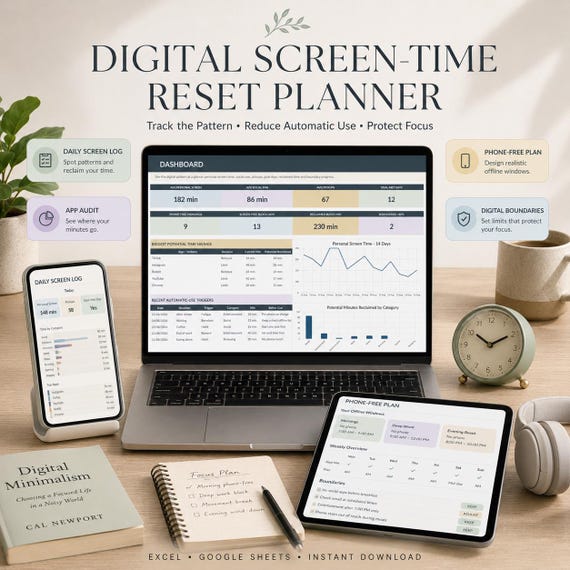
This connected system helps you track screen-time figures, audit app usage, identify triggers, create phone-free routines, and build practical alternatives for reclaimed time. It's designed as a digital-wellness planning system, not a rigid blocker.
WHAT'S INCLUDED:
- 1 premium Digital Screen-Time Reset Planner XLSX workbook (for Excel and Google Sheets)
- 10 connected workbook tabs
- Quick Start Guide PDF
- 6-page Goodnotes-friendly Digital Screen-Time Reset Companion PDF (also compatible with Notability)
- 5-Minute Digital Reset bonus PDF
- Read Me
- Personal Use Licence
10 CONNECTED WORKBOOK TABS:
- START HERE: Simple four-step setup and colour key.
- DASHBOARD: See personal screen time, social-media use, pickups, goal-met days, phone-free mornings, screen-free blocks, reclaimed minutes, app savings, recent triggers and boundaries.
- DAILY SCREEN LOG: Enter daily figures from iPhone Screen Time, Android Digital Wellbeing, or device settings. Track total screen minutes, social-media, entertainment, work/study minutes, pickups, phone-free morning, 30+ minute screen-free block, mood, energy, replacement activity, and notes.
- APP AUDIT: Review main apps and websites, including average daily minutes, opens, purpose, value, trigger risk, role, and make decisions to keep, limit, remove, or replace.
- TRIGGER PATTERNS: Record moments explaining automatic checking (habit, stress, boredom, fatigue, avoidance, reward, waiting, curiosity).
- PHONE-FREE PLAN: Create protected windows (e.g., first 30 minutes after waking, lunch, deep-work blocks, dinner, last hour before bed) and track adherence.
- FOCUS BLOCKS: Track phone-free work, study, reading, walking, exercise, meals, conversation, creative time or rest.
- REPLACEMENT ACTIVITIES: Build a menu of easy alternatives for reclaimed time based on minutes available, energy, setup effort, time of day, and location.
- DIGITAL BOUNDARIES: Create practical rules for social apps, entertainment, email, browsing, or phone-free routines. Workbook calculates adherence.
- WEEKLY REVIEW: Summarise average screen time, social media time, goal-met days, phone-free mornings, focus/rest blocks, reclaimed minutes, and trigger patterns.
HOW IT WORKS:
Manually enter data from your device's screen time settings. The spreadsheet uses conventional formulas and does not automatically import or sync data from any apps or services. No macros, VBA, or Power Query required.
WHAT YOU NEED:
- Microsoft Excel or Google Sheets (online or desktop versions)
- A PDF reader for the Quick Start Guide and bonus PDFs.
- A PDF annotation app like Goodnotes or Notability for the companion PDF (optional).
DELIVERY:
This is a digital download. No physical product will be shipped.
COMPATIBILITY NOTE:
The workbook is supplied as an XLSX file for Microsoft Excel and normal Google Sheets import. Minor visual differences may occur between Excel and Google Sheets.
- screen time tracker
- digital detox
- excel template
- google sheets
- phone addiction help
- digital wellness
- app usage log
- time management
- goodnotes pdf
- intentional living
- reduce phone use
- productivity tool
- self improvement
 Life & focus