Life & focus
Executive Function Planner Spreadsheet | Excel, Google Sheets & Goodnotes PDF
**Executive Function Planner Spreadsheet | Excel, Google Sheets & Goodnotes PDF** Turn scattered tasks, open loops and vague intentions into clear next actions with the SheetSmithery Executive Function Planner.
**Executive Function Planner Spreadsheet | Excel, Google Sheets & Goodnotes PDF**
Turn scattered tasks, open loops and vague intentions into clear next actions with the SheetSmithery Executive Function Planner.
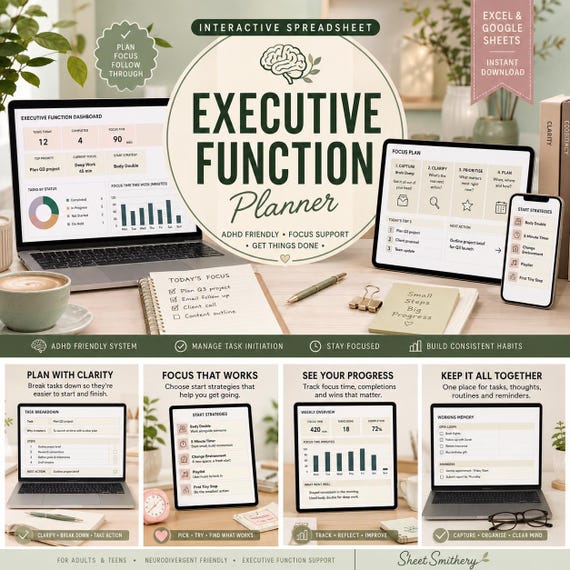
Designed as a connected productivity system rather than a basic to-do list, this planner helps you capture everything once, clarify what each task actually needs, choose work that fits your available time and energy, and keep reminders and follow-ups somewhere trusted outside your head.
The workbook combines **task initiation, prioritisation, working memory, capacity planning and weekly review** in one calm, visual system.
### WHAT’S INCLUDED
* Premium 10-tab Executive Function Planner XLSX workbook
* Quick Start Guide PDF
* 6-page Goodnotes-friendly Executive Function Companion PDF
* Read Me
* Personal Use Licence
10 CONNECTED WORKBOOK TABS
**Start Here**
A simple four-step introduction so you can start using the planner quickly.
**Dashboard**
See your open tasks, due-this-week items, ready-to-start tasks, open loops, started minutes, completed sessions and overdue work at a glance.
**Task Capture**
Your single master task list. Enter each task once and add priority, energy, estimated time, due date, planned date, next action, friction and context.
**Clarify & Prioritise**
Tasks automatically flow into practical action zones including **Do Now, Quick Win, Break Down, Plan, Waiting and Park**.
**Today**
A shorter view of the work that needs attention now, plus tasks that still need clarifying or making smaller.
**This Week**
See planned work, started minutes and your most important tasks across the current week.
**Time & Capacity**
Choose your current energy level and the time you actually have available. The planner then surfaces suitable ready-to-start tasks.
**Start & Momentum**
Track what helped you begin, including a 2-Minute Start, Just Next Step, Timer, Body Double, Environment Reset, Visual Cue and Quick Win.
**Working Memory**
Give reminders, ideas, waiting items, decisions and follow-ups somewhere reliable to live instead of trying to keep everything mentally active.
**Weekly Review**
Review what became easier to start, what stayed vague, what created friction and what support you want to use next week.
SMART EXECUTIVE FUNCTION FEATURES
The planner automatically helps classify tasks using a clear, transparent system.
Tasks can be marked as:
**READY** – clear enough to begin
**CLARIFY** – needs a more visible next action
**MAKE SMALLER** – friction is high and the task may need breaking down
It also automatically suggests an action destination such as:
**Do Now • Quick Win • Break Down • Plan • Waiting • Park**
This keeps the system practical without relying on complicated Excel-only formulas.
TIME & CAPACITY MATCHING
Not every task suits every moment.
Select:
**Current Energy:** Low / Medium / High
**Available Time:** 5 to 90 minutes
**Need an Easy Start?:** Yes / No
The planner then surfaces tasks that fit your current capacity.
### WORKING MEMORY SUPPORT
Use the Working Memory section for anything you do not want to keep mentally rehearsing.
Capture:
Reminders • Waiting items • Ideas • Information • Follow-ups • Decisions
Add a check date where useful and the workbook flags items that need attention.
GOODNOTES COMPANION INCLUDED
You also receive a separate **6-page Goodnotes-friendly PDF companion** for handwritten or tablet-based planning.
It includes:
Executive Function Daily Map
Tiny Steps Task Breakdown
Time & Capacity Check
Working Memory Sweep
Start Strategy Sheet
Weekly Executive Function Reset
The PDF can also be used with other PDF annotation apps such as Notability.
Please note: the interactive spreadsheet itself is not a Goodnotes file.
EXCEL + GOOGLE SHEETS
The workbook is supplied as an **XLSX file** for Microsoft Excel and normal Google Sheets import.
It uses conventional formulas and does **not** require:
Macros
VBA
Power Query
Minor differences in fonts, dropdown indicators or chart appearance may occur between Excel and Google Sheets.
WHO IT’S FOR
Suitable for adults, students, professionals, freelancers and anyone who benefits from breaking work into clearer next steps.
It may be particularly useful for people looking for an **ADHD-friendly or executive-function-friendly planning system**, but it is an organisational tool rather than a medical product.
### DIGITAL DOWNLOAD
This is a **digital product**. No physical item will be shipped.
Your download includes the workbook, Quick Start Guide, Goodnotes companion PDF, Read Me and Personal Use Licence.
PERSONAL USE
For personal use by the original purchaser only.
Files may not be resold, redistributed, shared, sublicensed or uploaded to template/file-sharing libraries.
DISCLAIMER
This planner is an organisational and productivity tool only. It does not diagnose, treat or provide medical or psychological advice and does not guarantee productivity, focus or specific outcomes.
- executive function
- task initiation
- ADHD planner
- task paralysis
- working memory
- time blindness
- capacity planner
- productivity sheet
- focus planner
- task tracker
- Excel planner
- Google Sheets
- Goodnotes planner
 Life & focus