Learn & create
Guitar Pathway Interactive Studio | Beginner to Advanced Lessons (HTML App)
Learn guitar through a clear, structured pathway with Guitar Pathway: Interactive Practice Studio, a self-paced browser-based guitar course designed to help learners build practical skills through foc…
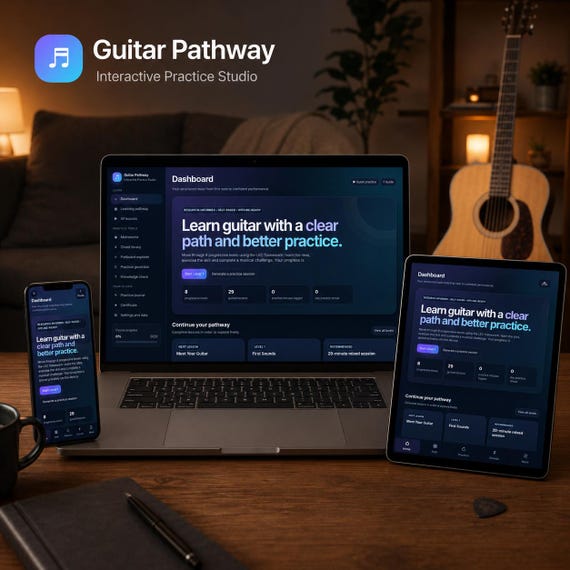
Learn guitar through a clear, structured pathway with Guitar Pathway: Interactive Practice Studio, a self-paced browser-based guitar course designed to help learners build practical skills through focused lessons, guided exercises and musical challenges.
Rather than jumping between disconnected videos and tutorials, Guitar Pathway provides a progressive route from your first notes and open chords through scales, fingerstyle techniques, chord construction, fretboard knowledge and advanced improvisation.
The studio contains 29 guided lessons across eight progressive levels, divided into Beginner, Intermediate and Advanced stages. It also includes interactive practice tools, progress tracking, knowledge checks and a personalised completion certificate.
WHAT YOU WILL RECEIVE
Your digital download includes:
• Guitar Pathway Interactive Practice Studio HTML learning app
• 29 structured guitar lessons
• Eight progressive learning levels
• Beginner, Intermediate and Advanced pathways
• Built-in metronome and tap tempo
• Slow-practice tempo ladder
• Standard guitar tuning reference tones
• Interactive chord library
• Fretboard and scale explorer
• Practice-session generator
• Chord-transition counter
• Practice timer
• Recall exercises and knowledge checks
• Practice journal and streak tracking
• Progress export and import tools
• Personalised printable completion certificate
• Quick-start instructions
• Customer support documents
• Personal-use licence
The main course is supplied as one self-contained HTML file, with the essential styling, course content and interactive tools built directly into the product.
A CLEAR LEARNING PATH
The programme is organised into three stages.
BEGINNER
Start with the foundations, including:
• Guitar parts, posture and playing position
• String names and standard tuning
• Producing clean single notes
• Reading guitar tablature
• Essential major and minor open chords
• Basic rhythm and chord changes
• First-position pentatonic scale patterns
• Building control through slow, accurate repetition
INTERMEDIATE
Develop your technique and understanding through:
• Major and minor scales
• Seventh chords
• Barre chord foundations
• The CAGED system
• Connecting chord shapes and scale patterns
• Chord and scale relationship exercises
• Fingerstyle foundations
• Rest-stroke technique
• Travis-style picking patterns
• Fretboard awareness and musical application
ADVANCED
Explore more developed musical concepts, including:
• Extended chords such as 9ths, 11ths and 13ths
• Drop 2 chord voicings
• Melodic minor and altered-scale ideas
• Improvisation over changing harmony
• Advanced chord and scale relationships
• Building more expressive and confident solos
THE LEC PRACTICE METHOD
Every lesson follows a consistent three-part structure.
LESSON
Learn the essential concept through focused, accessible explanations.
EXERCISE
Practise the skill through a specific drill, repetition target or timed activity.
CHALLENGE
Apply the skill in a musical task, play-along activity or performance challenge.
This structure helps learners move beyond passive reading and immediately put each new concept into practice.
BUILT-IN PRACTICE TOOLS
Guitar Pathway is more than a collection of written lessons.
The interactive studio includes practical tools designed to support regular, focused practice:
• Adjustable metronome
• Tap-tempo control
• Controlled tempo progression
• Practice timer
• Chord-change counter
• Mixed-practice session generator
• Interactive chord diagrams
• Fretboard visualisation
• Scale patterns
• Standard tuning reference tones
• Recall activities
• Knowledge-check questions
The course encourages slow practice, chunking, mixed practice, retrieval and repetition rather than rushing through lessons.
TRACK YOUR PROGRESS
Your studio includes:
• Lesson-completion tracking
• Course progress indicators
• Practice minutes
• Daily practice streaks
• Lesson reflections
• Personal practice journal
• Knowledge-check scores
• Exportable progress backup
• Printable personalised certificate
Progress is stored privately in the browser on your device and is not uploaded to an external account.
An export tool is included so you can create a backup before changing devices, browsers or clearing browser data.
ACCESSIBILITY OPTIONS
The course includes adjustable settings for different learning preferences:
• Left-handed chord diagrams
• Larger text
• Higher-contrast display
• Reduced interface motion
• Touch-friendly controls
• Responsive desktop and mobile layouts
HOW TO USE
1. Purchase and download the supplied ZIP folder.
2. Extract or unzip the folder on your device.
3. Open the Start Here instructions.
4. Open the Guitar Pathway HTML file in a current web browser.
5. Complete the short setup process.
6. Start with Level 1 or choose the most suitable starting point.
7. Use the same browser and file location whenever possible so your progress remains available.
8. Export a progress backup regularly, particularly before moving to another device.
No specialist music software is required.
DEVICE COMPATIBILITY
Best suited to:
• Windows computers
• Apple Mac computers
• Chromebooks
• Android tablets and phones
• Modern desktop browsers such as Chrome, Edge, Firefox and Safari
The course includes responsive desktop and mobile layouts.
iPhone and iPad note: locally downloaded HTML files can behave differently depending on the browser, download location and iOS security settings. Customers may need to save the file in Files or Downloads and open it through Safari.
Audio begins after the user taps a control.
Progress is connected to the browser and file location, so regular backups are recommended.
WORKS OFFLINE
The core lessons, diagrams, progress tools and practice features can be used offline after the product has been downloaded and extracted.
Some optional musical challenges open an external video search and require an internet connection.
No videos, subscription content or copyrighted songs are embedded in the download.
IDEAL FOR
• Complete guitar beginners
• Returning players rebuilding their foundations
• Self-taught guitarists who want more structure
• Acoustic or electric guitar learners
• Adults and teenagers studying independently
• Home education and enrichment activities
• Learners who prefer visual and interactive resources
• Guitarists who want a more organised practice routine
• A practical digital gift for a new guitar player
IMPORTANT INFORMATION
• This is an instant digital download.
• No physical item will be posted.
• A guitar is not included.
• The product is supplied inside a ZIP folder.
• This is a browser-based learning resource, not a hosted website or App Store application.
• The core product does not require an account or monthly subscription.
• Progress is stored locally on the learner’s device.
• Clearing browser data, changing browsers or moving the file may remove locally saved progress.
• External musical challenges require internet access.
• The completion certificate is not an accredited qualification.
• This learning resource supports independent practice but does not replace personalised instruction from a qualified guitar teacher.
• Stop practising and seek appropriate guidance if playing causes pain or persistent discomfort.
LICENCE
Purchase includes a personal-use licence for one individual or household.
The files may not be resold, shared publicly, redistributed, copied into another product, uploaded to file-sharing websites or used for commercial teaching, classroom or organisational purposes without written permission.
DIGITAL DOWNLOAD ONLY. NO PHYSICAL PRODUCT WILL BE POSTED.
- html learning app
- hobbies
- learn the guitar
- guitar lessons
- guitar gift
- learn guitar app
- guitar lover
- practice guitar
- digital guitar guide
- guitar planner
- beginner guitar
- play guitar
- education
 Learn & create