Money
Meal Planning & Grocery Budget Tracker (Excel, Google Sheets)
Plan meals and keep grocery spending visible in one organised workbook.
Plan meals and keep grocery spending visible in one organised workbook.
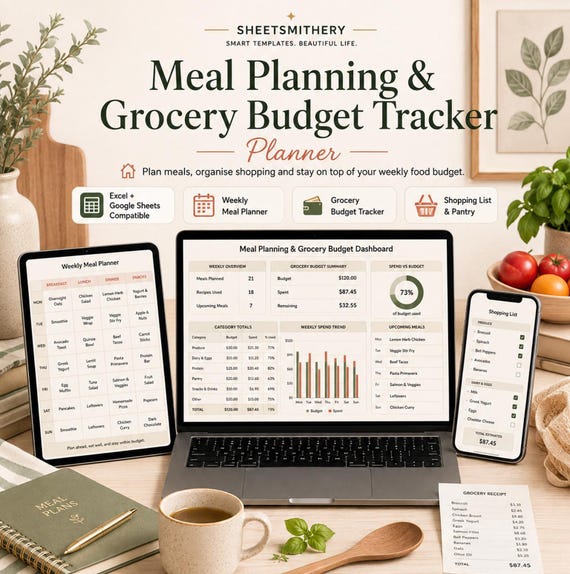
The Meal Planning and Grocery Budget Tracker brings weekly meal planning, grocery budgeting, shopping lists, pantry stock, recipes, meal ideas and price tracking into one practical spreadsheet system.
The workbook includes realistic sample data so you can understand the layout before replacing the examples with your own household information. The Dashboard updates from the Weekly Meal Planner, Grocery Budget, Shopping List and Pantry Inventory sheets using standard spreadsheet formulas.
This is a planning and tracking tool. It does not guarantee savings, reduced food waste, improved nutrition or any other outcome.
WHAT IS INCLUDED
- 1 master XLSX workbook
- Quick Start Guide PDF
- Read Me First file
- Personal Use Licence
WORKBOOK SECTIONS
1. Start Here
2. Dashboard
3. Weekly Meal Planner
4. Shopping List
5. Grocery Budget
6. Pantry Inventory
7. Recipe Bank
8. Meal Ideas
9. Price Tracker
10. Notes
GENUINE FEATURES
- Live meal and grocery budget Dashboard
- Weekly breakfast, lunch, dinner and snack planning
- Grocery category budgets
- Actual spend tracking
- Remaining budget calculations
- Budget percentage tracking
- Shopping list with quantity and purchase status
- Estimated and actual grocery cost fields
- Purchase-day tracking
- Pantry, fridge and freezer inventory
- Automatic restock flag
- Recipe bank
- Meal idea bank
- Grocery price tracker
- Dropdown fields
- Conditional formatting
- Filters and freeze panes
- Realistic sample data
- UK date format
- UK pound labels and formatting where money is used
- No macros, VBA or external data connections
COMPATIBILITY
Microsoft Excel: XLSX workbook.
Google Sheets: Upload the same XLSX into Google Drive or Google Sheets and open it there.
The workbook uses standard formulas and common spreadsheet features selected for normal Google Sheets import. It was not live-tested inside Google Sheets during production. Minor differences in fonts, table styling, charts, conditional formatting or print layouts may occur after import.
DIGITAL PRODUCT
This is a digital download. No physical item will be posted or shipped.
PERSONAL USE
Your purchase is licensed for your own personal use. You may edit the workbook for your own needs and keep one personal backup copy. Resale, redistribution, sharing, marketplace upload and use as the basis of another resale product are not permitted.
BASIC CUSTOMER INSTRUCTIONS
1. Download the customer ZIP.
2. Read Read_Me_First.txt.
3. Open the XLSX in Microsoft Excel, or upload that same XLSX into Google Sheets.
4. Review the sample week and sample grocery data.
5. Replace category budgets and meal entries with your own information.
6. Add or remove Shopping List and Pantry Inventory rows as needed.
7. Use the dropdowns to keep categories and statuses consistent.
8. Review the Dashboard as your records change.
9. Use the Quick Start Guide for setup and troubleshooting.
- meal planner
- grocery budget
- food budget
- shopping list
- pantry inventory
- meal planning
- excel meal planner
- google sheets meal
- recipe organiser
- food planner
- budget spreadsheet
- weekly meal plan
- Shopping budget
 Money