Money
No-Spend Challenge Tracker Spreadsheet | Mindful Spending Planner (Excel Google Sheets)
Reset your spending without turning every necessary purchase into a failure.
Reset your spending without turning every necessary purchase into a failure.
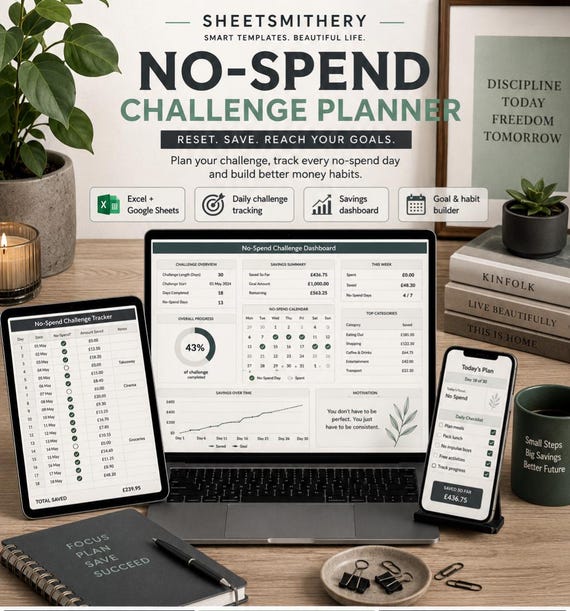
The No-Spend Challenge Planner is a structured spreadsheet system for no-spend, low-spend, essentials-only and category-freeze challenges. It goes beyond a simple calendar by keeping actual spending, purchases you avoided and money you genuinely transferred to savings as separate records.
Set your own rules, choose a challenge length, record daily status, log essential, planned and unplanned spending, pause non-essential purchases before buying, identify common triggers and review each week.
The workbook includes realistic sample data so you can understand the formulas before replacing the examples with your own information.
IMPORTANT
This is a personal planning and record-keeping tool. It does not provide financial, tax or legal advice, block transactions, connect to a bank or guarantee savings.
WHAT IS INCLUDED
- 1 master XLSX workbook
- Quick Start Guide PDF
- Read Me First file
- Personal Use Licence
WORKBOOK SECTIONS
1. Start Here
2. Dashboard
3. Challenge Setup
4. Spending Rules
5. Spend Log
6. Avoided Purchases
7. Wish List & Pause
8. Triggers & Swaps
9. Savings Allocation
10. Daily Tracker
11. Weekly Review
12. Challenge History
GENUINE FEATURES
- Flexible 7, 14, 21, 30 or 31 day challenge setup
- Challenge styles including Strict No Spend, Flexible No Spend, Low Spend, Essentials Only, Category Freeze and Custom
- Personal Spending Rules table
- Daily challenge tracking
- Separate Essential, Planned and Unplanned spending totals
- Spend Log with payment-method and within-rules fields
- Avoided Purchases log
- Skipped, Deferred, Purchased Later and Still Deciding outcomes
- Wish List & Pause tracker
- 10-minute, 24-hour, 48-hour and 7-day pause options
- Triggers & Swaps tracker
- Savings Allocation log for money actually transferred or set aside
- Weekly Review summaries
- Challenge History for repeat challenge rounds
- Live Dashboard
- Challenge progress and within-rules rate
- No-spend-day count
- Recorded unplanned spending
- Avoided-spend total based only on purchases marked Skipped
- Saved / Transferred total based only on confirmed savings records
- Dropdown fields
- Conditional formatting
- Filters and freeze panes
- Dashboard charts
- Realistic sample data
- UK date formatting
- UK pound formatting
- No VBA, macros or external data connections
COMPATIBILITY
Microsoft Excel: XLSX workbook.
Google Sheets: Upload the same XLSX into Google Drive or Google Sheets and open it there.
The workbook uses standard formulas and common spreadsheet features selected for normal Google Sheets import. It was not live-tested inside Google Sheets during production. Minor differences in fonts, charts, conditional formatting, table styling or print layout may occur after import.
DIGITAL PRODUCT
This is a digital download. No physical product will be posted or shipped.
PERSONAL USE
Your purchase is licensed for your own personal use. You may edit the workbook for your own needs and keep one personal backup copy. Resale, redistribution, sharing, marketplace upload and use as the basis of another resale product are not permitted.
BASIC CUSTOMER INSTRUCTIONS
1. Download the customer ZIP.
2. Read Read_Me_First.txt.
3. Open the XLSX in Microsoft Excel, or upload that same XLSX into Google Sheets.
4. Review the sample challenge.
5. Set your challenge dates, length, style and personal rules.
6. Replace the sample Spend Log and other example records.
7. Use Daily Tracker to mark each day.
8. Record skipped purchases in Avoided Purchases.
9. Record actual transfers or money set aside in Savings Allocation.
10. Review the Dashboard and Weekly Review as your challenge progresses.
- household budget
- bundle
- finance tracker
- bookkeeping
- small business
- pay debt
- debt tracker
- simple budgeting
- savings
- savings tracker
- savings spreadsheet
- spend tracker
- saving
 Money